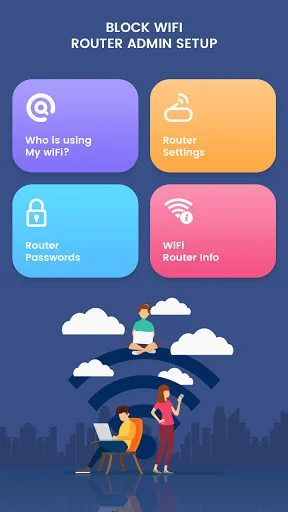
Take control of your home network from your phone. Detect unauthorized users, block bandwidth hogs, and manage every device connected to your WiFi with just a few taps.
Discover who is using your WiFi without permission. Our real-time scanner reveals every device connected to your network, showing IP and MAC addresses so you can spot intruders the moment they appear.
Take instant action against unauthorized users or manage family internet time. Simply tap any device to block or unblock access to your WiFi whenever you need complete control.
Stop wondering why your internet is slow. Identify which devices are consuming the most bandwidth and take action to restore your connection speed in seconds.
Skip the complicated browser interfaces and tech support wait times. Our automatic gateway detection connects you to your router admin panel instantly, making network management simple for everyone.
Managing a wireless network often feels like a full-time job when your internet speed starts to drop for no obvious reason. It is actually quite interesting how a digital tool can take a massive list of active connections and turn them into a clear display in seconds. The Block WiFi: Router Admin Setup is designed for those times when a slow connection feels like a puzzle you just cannot solve on your own.
While many users feel overwhelmed by complex gateway addresses, using the WiFi Blocker: Router Setup for immediate access can simplify the entire administrative process. Most people find that the interactive scanner and the detailed device logs are surprisingly easy on the eyes during a long session of monitoring. It is truly that simple to deploy the software whenever an unknown MAC address appears in your local history.
Real-Time Monitoring with WiFi Thief Detector: Who Uses My WiFi:
Intruders often get away with stealing bandwidth because finding them is too difficult on a standard mobile browser. Since the WiFi Thief Detector: Who Uses My WiFi acts as a constant security companion, you never have to worry about missing an unauthorized login. Most users realize the WiFi Thief Detector: Who Uses My WiFi helps organize local lists for better accessibility regardless of where the router is located. Actually, this system has everything you need to bring your network security to life!
Toggle Access with the WiFi Block And Unblock App:
Every function and step in the WiFi Block And Unblock App is designed for those who want to manage their traffic effectively and effortlessly. Whether you are preparing a restricted window for the kids or just want to check a result, the interface is the perfect companion for your device. Indeed, the WiFi Block And Unblock App makes the process feel very fast for the average user who is in a rush. Snap, scan, and save in just a few seconds to create the ultimate secure environment for your mobile device without any hidden fees.
Secure Your Local Gateway Today:
Using the WiFi Manager: Block WiFi Users On Device ensures that you are ready for any situation where a guest might ask for the password. The Block WiFi: Router Admin Setup makes the whole process feel very fast for the average user who wants to be an expert in network privacy. You can finally bring your home connection to life by turning your mobile phone into a professional auditing tool. This ensures your wireless environment stays clean and optimized.
Fixing your network routine should be quick and easy for everyone involved in the process! This app is all about quick views and fun ways to manage your connections while you are busy with your life. Enjoy the software and have fun with what the technology does for your phone during your daily tasks. Go ahead and download the tool now to experience the ease of mobile security on your own device today.
This app is great, and easy to use. I had my doubts when I first downloaded it, but those doubts were fast gone when I started using this app. Now I have it on all my devices and highly recommend it to any-and-everyone I run across who is frustrated with having to wait for a tech. to help with troubleshooting Wi-Fi. This app can help you do it all by yourself, and is very easy to use. I give it 5 ⭐
I dont leave reviews on apps i download but this app is amazing honestly! Its pretty much a shortcut to your router companys settings in that not only allows you to change your mac settings but can allow you access to the many functions and settings such as devise status, firewall information, and even diagnostics
It works!!! I can see all the devices on my WiFi. You connect your router to the app, and you can kick off intruders and Block them. Same w the turds using up your WiFi, kick em off when they're take all the WiFi up!!!
I didn't think giving an app 5 stars was possible until I met this app. I can see who uses my Wi-Fi and block strangers and I can also unblock them whenever I want to.
There was a lot of people whom did hack me again again and again but after I blocked them every thing changed thanks to this app
This is wonderful app that let me know how many devices are using internet on my router. I can block intruders easily.